WPRI Pinpoint Weather 12
Publisher Description


Download the WPRI Weather app for fast, accurate Providence weather and alerts.
Never let the weather catch you by surprise again. The trusted weather experts of the Pinpoint Weather Team deliver Rhode Island & SE Massachusetts' most accurate hour-by-hour forecast for the next day and for the week ahead. Unlike other weather apps, you'll get a local forecast that is customized for you.
Download the WPRI Weather app for fast, accurate local and national weather at your fingertips. With its personal alert notifications, you'll know when significant weather is heading your way and when to take cover. And when you are traveling, use WPRI Weather to get real-time weather forecasts, interactive radar and current conditions for anywhere in the U.S.
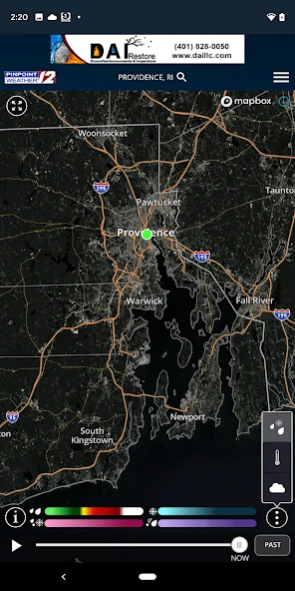
The WPRI Weather app utilizes the most advanced radar maps, weather and digital technology available. With its easy to use interactive radar, you can take control and see where the storm is now and where it is tracking. Then, set customized alerts to keep you and your family informed and safe.
Features:
- Live interactive radar with many layering options lets you track the storms around you
- Alerts for severe weather go to your home screen and cue an audio alert
- The most accurate hour-by-hour forecast for the next day and week ahead for Rhode Island & SE Massachusetts
- The latest video forecast from Pinpoint Weather Team
- Current weather conditions for Rhode Island & SE Massachusetts and anywhere in the United States
- Share the weather conditions via text message, email, Facebook or Twitter
- You can set multiple custom locations to track forecasts, alerts, radar, and more
- Weather blog from Pinpoint Weather Team
About WPRI Pinpoint Weather 12
The company that develops WPRI Pinpoint Weather 12 is Nexstar Inc.. The latest version released by its developer is 1.0 .
To install WPRI Pinpoint Weather 12 on your Android device, just click the green Continue To App button above to start the installation process. The app is listed on our website since 2026-07-02 and was downloaded 4 times. We have already checked if the download link is safe, however for your own protection we recommend that you scan the downloaded app with your antivirus. Your antivirus may detect the WPRI Pinpoint Weather 12 as malware as malware if the download link to com.wpri.android.weather is broken.
How to install WPRI Pinpoint Weather 12 on your Android device:
- Click on the Continue To App button on our website. This will redirect you to Google Play.
- Once the WPRI Pinpoint Weather 12 is shown in the Google Play listing of your Android device, you can start its download and installation. Tap on the Install button located below the search bar and to the right of the app icon.
- A pop-up window with the permissions required by WPRI Pinpoint Weather 12 will be shown. Click on Accept to continue the process.
- WPRI Pinpoint Weather 12 will be downloaded onto your device, displaying a progress. Once the download completes, the installation will start and you'll get a notification after the installation is finished.
Program Details
System requirements
Download information
Pricing
Version History
version
posted on 2026-07-02
version 5.3.703
posted on 2021-06-04
Performance improvements
version 5.0.400
posted on 2020-05-12
Improved weather data source to give you accurate current conditions and forecasts from your favorite weather source!
version 4.10.300
posted on 2019-07-10
Location Management
*Press location in top bar to change, edit and add locations
*In the left menu for changing locations, press the 3 dots next to the location to edit location settings and make a location capable of receiving push notifications.
More Information Available on the Map
*Pressing on map based Alerts will show the bulletin text
*Pressing on Storm Tracks outlines possible storm threats
*Pressing on Earthquakes or Tropical Tracks provides more detail than ever before
version 4.5.1301
posted on 2017-10-18
* bug fixes
version 4.3.501
posted on 2016-10-11
- Improved PinPointing User Experience,- Improved design on blog and video pages,- More comprehensive settings menu, added options for user-controlled audio alerts,- Bug fixes
